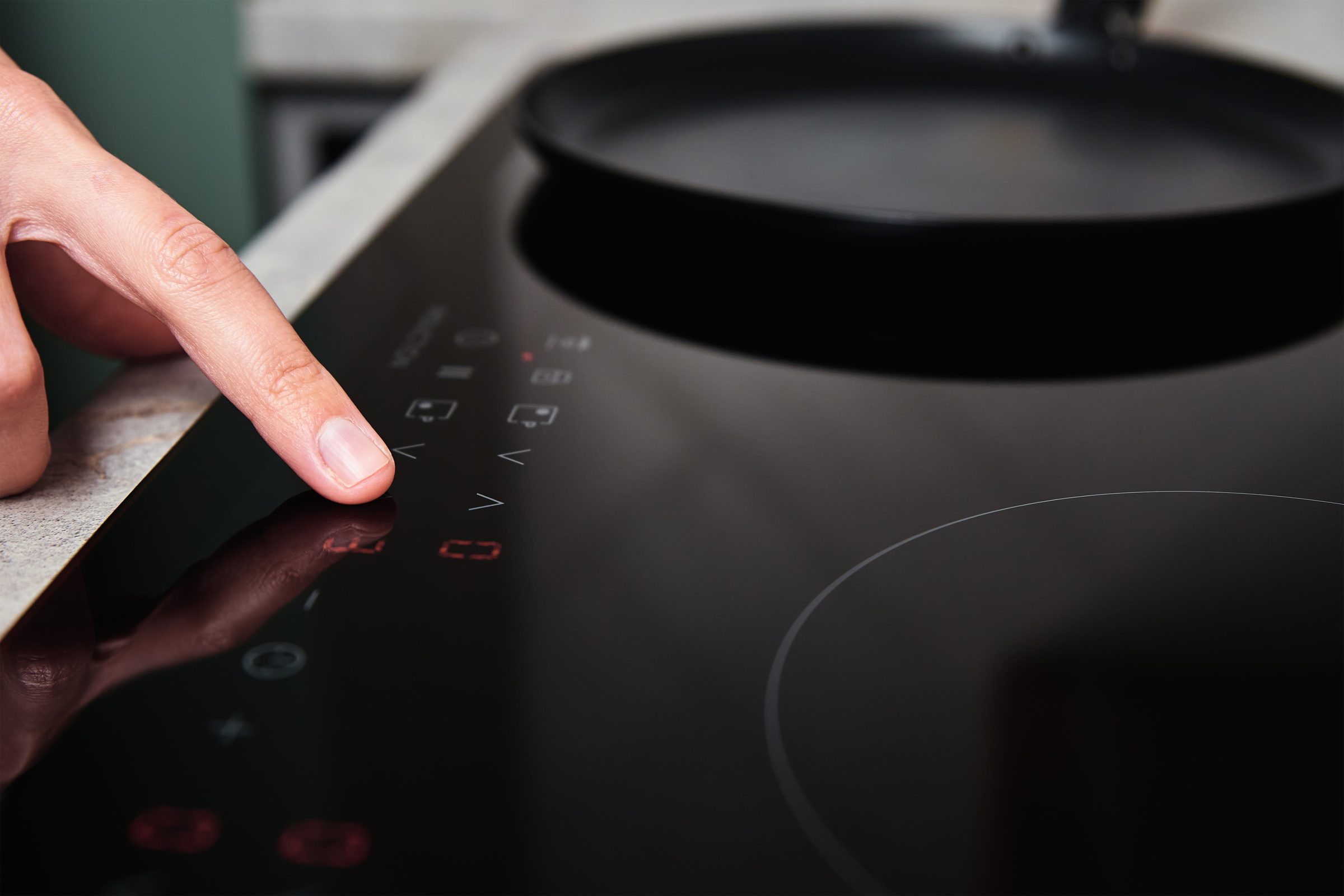
- “A lock symbol on the display”
- “Beeps but nothing happens”
- “Panel dead with the cooktop otherwise powered”
Symptom
Thermador cooktop controls locked or unresponsive
A cooktop that beeps and refuses, shows a lock symbol, or ignores the panel entirely. Spilled liquid and a wiped-but-damp surface are the usual reasons.
- From $95 diagnostic, credited to the repair
- 59 cities and neighborhoods covered
- OEM parts available on order
- In writing the price, before anything is opened
Five ordinary causes
What this usually turns out to be
Cheapest and commonest first, which is also the order we check them in. They sit hundreds of dollars apart, and only the unit settles which one is yours.
-
Liquid or a damp cloth on the panel
The controls read a change in capacitance, and water looks like a finger. It locks out deliberately rather than boiling something by accident.
-
The child lock is on
Easy to set without meaning to while wiping the glass. The symbol is small and the release is a press-and-hold rather than a tap.
-
A pan or a cloth resting on the controls
Same effect as a wet panel: the cooktop reads a key held down and stops accepting anything else.
-
A control condition after a spill dried in
Sugar under the glass edge holds moisture for days. It clears with a proper clean more often than with a part.
-
The touch control itself
When it is dry, clear and cold and still unresponsive, the control is the repair.
Cooktop and induction repair from $240
In five minutes
Before you call anybody
None of it needs tools, and all of it makes the visit shorter.
-
01
Dry it completely, then wait
A dry cloth, then five minutes. A surface that looks dry can still hold a film that the panel reads.
-
02
Look for the lock symbol
And hold its key rather than tapping it. Most child locks release on a press of a few seconds.
-
03
Clear everything off the glass
Including a pan sitting across the control strip, which is easy to do on a full cooktop.
-
04
Power off at the breaker for five minutes
It resets the controls. A condition that survives that is worth a call.
How it shows up
What people describe when they call

Two shortcuts
Narrow it down before anybody arrives
A description of the behaviour leaves a few possible causes. A code names the subsystem, and the model number says which parts to bring. Either one shortens the visit; both together usually settle it.
If the display is showing something
Photograph it before it clears — codes do not wait. Search the full code list
If there is no code at all
The data plate is inside the cabinet, upper left wall or behind the grille. All models
In more detail
About Thermador cooktop controls locked or unresponsive
The fastest diagnosis is the code
A wet or soiled panel is published as its own condition on this make. Dry the glass completely, including the film left by a cloth, and try again before anything else — this is the single most common reason an induction top stops responding.
The cooktop is protecting you
A touch surface with liquid on it cannot tell a spill from a fingertip. Rather than guess, the cooktop locks out and says so — which is the correct behavior for an appliance that could otherwise be switched to full power by a puddle. The manufacturer publishes it as a condition rather than leaving it as a mystery beep.
Before you call anybody
- Dry the glass properly, including under the edge of any spill that has dried in
- Check for a lock symbol, and hold the key rather than tapping it
- Move anything resting on the control strip
- Five minutes off at the breaker
This article is based on:
- Official manufacturer documentation
- Internal repair procedures
- Technician repair history
- Company quality standards
Before you book
Questions about thermador cooktop controls locked or unresponsive
It beeps three times and turns off.
Usually the panel reading something it should not: liquid, a cloth, or a pan resting on the controls. Clear and dry the glass and try again before assuming anything is wrong.
How do I turn the child lock off?
Press and hold the key with the lock symbol rather than tapping it — typically for a few seconds. Tapping it does nothing, which is exactly why the lock is useful and also why people think the cooktop is broken.
It works some days and not others.
That pattern points at moisture rather than hardware. Look at what is being cooked when it happens — steam from a stockpot condenses on the panel just as effectively as a spill.
Where we do it
Across Miami-Dade, Broward, and Palm Beach
Same terms everywhere we go: an on-site diagnostic first, the price agreed in writing, and the exact figure confirmed once we have seen the unit.
Neighborhoods people ask for by name